A software platform
for ESP32 devices.
Pixlet turns an ESP32 board into one useful thing at a time: a clock, the weather, your markets, a habit tracker, a photo frame. Pick the Pixlets you want from the Pix Store. The home screen and every free Pixlet cost nothing to install, no phone app needed.
Get the hardware
Pixlet runs on a small touch-screen board you buy separately, then install Pixlet on yourself from your browser.
Loading...
One screen, many Pixlets
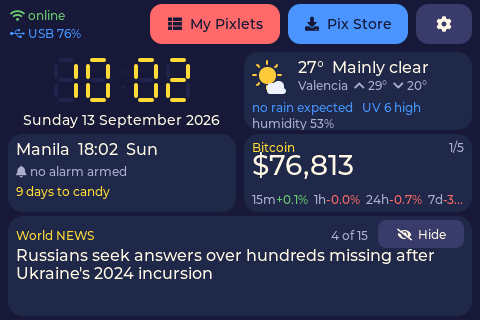
Every Pixlet is a small, focused app. The home screen shows a dashboard; tap a tile to run a Pixlet full screen, tap home to come back. Six of your favourites stay in device memory and start instantly.
Up and running in five minutes
What is in the box
Settings that stay put
Everything you set is stored on the device itself. Reformat the card, swap it, lose it: your habits, alarms, cities and market list are still there. Pixlets update themselves from the Pix Store, and the home screen updates too.